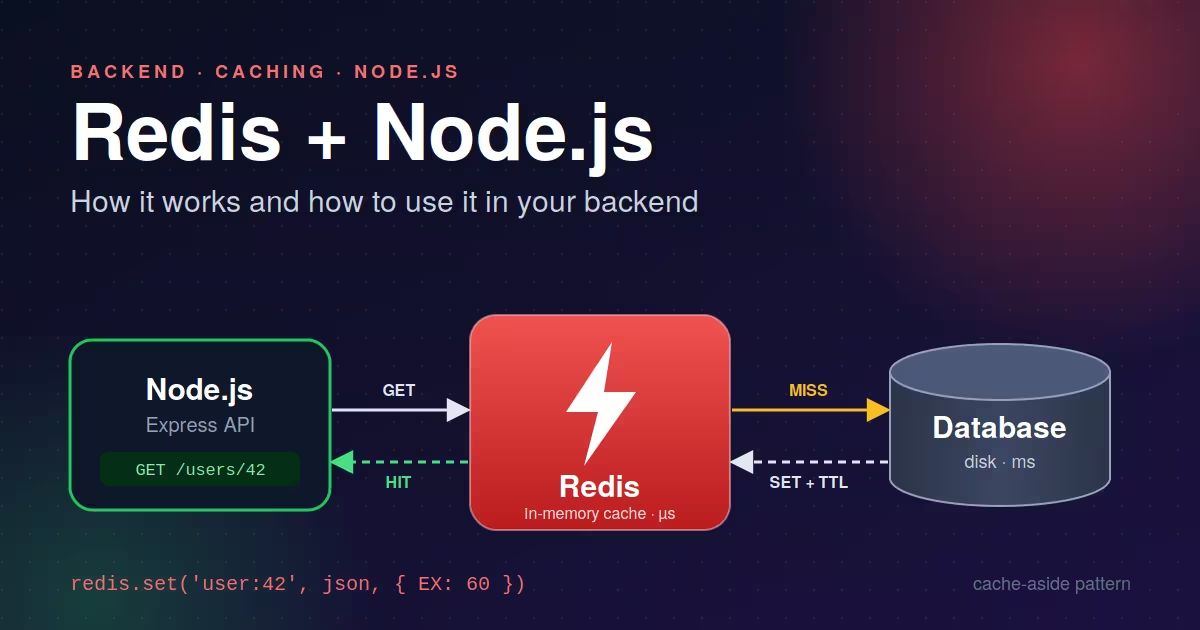
If you've ever watched an endpoint slow down because it hits the database on every request, you've probably been told to "just add Redis." This post explains what Redis is, why it's fast, and how to use it in a Node.js backend.
What is Redis?
Redis (Remote Dictionary Server) is an in-memory data store. You give it a key, it stores a value, and you get that value back later, like a giant shared JavaScript object that lives in its own server process and is accessible over the network.
It's commonly used as:
A cache in front of a slower database
A session store
A rate limiter
A message broker (pub/sub and streams)
A leaderboard or counter service
A job queue backend
How Redis works under the hood
1. Everything lives in RAM
Redis keeps its dataset in memory, so reads and writes take microseconds instead of the milliseconds a disk-based database needs. The trade-off is that RAM is more expensive and limited than disk, so Redis is best for data that is hot, small, or temporary.
2. Single-threaded command execution
Redis executes commands on a single main thread. That sounds like a limitation, but it means no locks and no race conditions between commands. Each command is atomic. Since every operation is an in-memory action taking microseconds, one thread can handle a very large number of requests per second. (Newer versions can use extra threads for network I/O, but command execution stays single-threaded.)
3. Rich data structures, not just strings
Redis is often called a "data structure server" because values can be:
Type Good for String Cached JSON, counters, flags Hash Objects with fields (user profiles) List Queues, recent activity feeds Set Unique items, tags, followers Sorted Set Leaderboards, priority queues Stream Event logs, message processing
Because operations like "increment this counter" or "add to this sorted set" happen inside Redis, you avoid the read-modify-write cycle in your app code.
4. Expiration and eviction
Any key can have a TTL (time to live), after which Redis deletes it automatically. That's what makes it a natural cache. If memory fills up, Redis can also evict keys according to a policy you configure, such as allkeys-lru (drop the least recently used keys).
5. Persistence (optional)
Even though data lives in memory, Redis can write to disk in two ways:
RDB snapshots: point-in-time dumps at intervals. Compact and fast to restore, but you can lose the most recent writes.
AOF (Append Only File): logs every write command. Safer and more durable, but larger files.
You can use either, both, or neither. For a pure cache, you often don't need persistence.
6. Scaling and availability
Replication: replicas copy data from a primary, giving you read scaling and failover candidates.
Sentinel: monitors nodes and promotes a replica if the primary dies.
Cluster: shards data across multiple nodes when one machine's memory isn't enough.
Setting up Redis locally
The quickest way is Docker:
docker run -d --name redis -p 6379:6379 redis:7
Then check that it works:
docker exec -it redis redis-cli
> SET greeting "hello"
OK
> GET greeting
"hello"
> EXPIRE greeting 10
(integer) 1
> TTL greeting
(integer) 10
Using Redis in Node.js
The two most popular clients are node-redis (redis on npm) and ioredis. Both are solid. This post uses node-redis.
npm install redis express
Creating a shared client
Create the connection once and reuse it across your app. Don't open a new connection per request.
// redis.js
import { createClient } from 'redis';

export const redis = createClient({
  url: process.env.REDIS_URL || 'redis://localhost:6379',
});

redis.on('error', (err) => console.error('Redis client error:', err));

await redis.connect();
Basic operations
import { redis } from './redis.js';

// Strings with an expiry (60 seconds)
await redis.set('site:motd', 'Welcome!', { EX: 60 });
const motd = await redis.get('site:motd');

// Counters
await redis.incr('page:views');

// Hashes
await redis.hSet('user:42', { name: 'Asha', plan: 'pro' });
const user = await redis.hGetAll('user:42');

// Delete
await redis.del('site:motd');
Use case 1: Caching (the cache-aside pattern)
This is the most common pattern. Check Redis first, and on a miss, load from the database and store the result.
import express from 'express';
import { redis } from './redis.js';
import { db } from './db.js'; // your database layer

const app = express();

app.get('/users/:id', async (req, res) => {
  const key = `user:${req.params.id}`;

  // 1. Try the cache
  const cached = await redis.get(key);
  if (cached) {
    return res.json({ source: 'cache', data: JSON.parse(cached) });
  }

  // 2. Cache miss: hit the database
  const user = await db.users.findById(req.params.id);
  if (!user) return res.status(404).json({ error: 'Not found' });

  // 3. Store it with a TTL
  await redis.set(key, JSON.stringify(user), { EX: 60 });

  res.json({ source: 'db', data: user });
});
When the underlying data changes, invalidate the cache:
app.put('/users/:id', async (req, res) => {
  const user = await db.users.update(req.params.id, req.body);
  await redis.del(`user:${req.params.id}`);
  res.json(user);
});
Cache invalidation is famously hard. Short TTLs plus explicit deletes on writes will cover most apps.
Use case 2: Rate limiting
Redis's atomic counters make rate limiting straightforward. This is a simple fixed-window limiter allowing 100 requests per minute per IP:
export async function rateLimit(req, res, next) {
  const key = `rate:${req.ip}`;
  const limit = 100;
  const windowSeconds = 60;

  const count = await redis.incr(key);
  if (count === 1) {
    await redis.expire(key, windowSeconds);
  }

  if (count > limit) {
    return res.status(429).json({ error: 'Too many requests' });
  }
  next();
}

app.use(rateLimit);
There's a tiny edge case here: if the process crashes between incr and expire, the key never expires. For production, wrap both in a MULTI transaction or a Lua script, or use a library like rate-limiter-flexible.
Use case 3: Leaderboards with sorted sets
Sorted sets keep members ordered by score automatically, with no sorting in your app code.
// Add or update scores
await redis.zAdd('leaderboard', [
  { score: 1500, value: 'alice' },
  { score: 2300, value: 'bob' },
]);
await redis.zIncrBy('leaderboard', 200, 'alice');

// Top 10, highest first
const top = await redis.zRangeWithScores('leaderboard', 0, 9, { REV: true });
// [{ value: 'bob', score: 2300 }, { value: 'alice', score: 1700 }]
Use case 4: Pub/Sub
Pub/Sub lets one part of your system broadcast messages and others react to them, which is useful for real-time notifications or syncing multiple Node instances. A client in subscribe mode can't run normal commands, so use a dedicated connection with duplicate().
// subscriber.js
const subscriber = redis.duplicate();
await subscriber.connect();

await subscriber.subscribe('orders:new', (message) => {
  const order = JSON.parse(message);
  console.log('New order received:', order.id);
});

// publisher (anywhere in your app)
await redis.publish('orders:new', JSON.stringify({ id: 123, total: 49.99 }));
Note that Pub/Sub is fire-and-forget: if a subscriber is offline, it misses the message. If you need durability, look at Redis Streams or a queue library like BullMQ, which is built on Redis and is the standard choice for background jobs in Node.
Use case 5: Sessions
For session storage with Express, the connect-redis package plugs into express-session. This lets multiple Node instances share sessions, which is essential once you scale beyond one server.
Best practices and common pitfalls
Always set a TTL on cache keys unless you have a reason not to. Otherwise your memory usage only grows.
Use consistent key naming, like
entity:id:field(user:42:profile), so keys are easy to find and manage.Never use
KEYS *in production. It blocks Redis while scanning everything. UseSCANinstead.Avoid huge values. Storing multi-megabyte blobs hurts latency for everyone sharing that instance.
Watch for cache stampedes. When a popular key expires, many requests may hit your database at once. Mitigations include jittered TTLs and short-lived locks.
Don't treat Redis as your only source of truth unless you've deliberately configured persistence and replication for that.
Handle Redis failures gracefully. If Redis is down, a cache should degrade to hitting the database, not crash your API. Wrap calls in
try/catchwhere appropriate.Shut down cleanly: call
await redis.quit()on process exit.
Wrapping up
Redis is fast because it keeps data in memory, executes commands atomically on a single thread, and offers data structures that map directly to common backend problems. In a Node.js app, a few lines of code can cut database load with caching, protect your API with rate limiting, or power real-time features with Pub/Sub.
Start small by caching your slowest read endpoint with a short TTL, measure the difference, and expand from there.

Rohit Bairwa
Published on · 8 min read read