For general contractors and trade partners, choosing the right payroll software can make or break field operations. Miter has long been a recognizable name for construction-specific payroll and time tracking, but shifting business needs, pricing updates, and evolving reporting requirements mean many construction companies are actively looking for Miter alternatives.
When you evaluate payroll software built for the job site, general office tools like Gusto or QuickBooks often fall short of handling union rules, certified payroll reports, and multi-state compliance. Finding a platform that bridges the gap between field data collection and back-office accounting is essential.
This guide breaks down the best Miter alternatives on the market, compares their core features, and explains why Lumber has emerged as the definitive choice for modern construction teams.
What to Look for in a Construction Payroll Platform
Before diving into specific alternatives, it helps to understand what sets construction payroll apart from standard office payroll. Standard SaaS tools assume a stationary workforce with uniform tax jurisdictions and predictable hours. Construction is entirely different.
A robust Miter alternative must handle several industry-specific complexities:
Certified Payroll Reporting: Generating WH-347 forms and state-specific compliance reports without manual spreadsheet manipulation.
Multi-State and Multi-Jurisdiction Taxation: Automatically calculating local, state, and municipal taxes when crews move between job sites across county or state lines.
Union Compliance: Managing complex union pay rates, fringe benefits, deductions, and tiered pay scales based on trade classifications.
Job Costing Integration: Connecting hours worked directly to specific project phases and budgets so project managers know their labor costs in real time.
Mobile Time Tracking: Enabling field crews to clock in and out from remote job sites with poor cellular connectivity.
Top Miter Alternatives Compared
To find the right platform, let's look at how the leading payroll and workforce management tools stack up against each other.
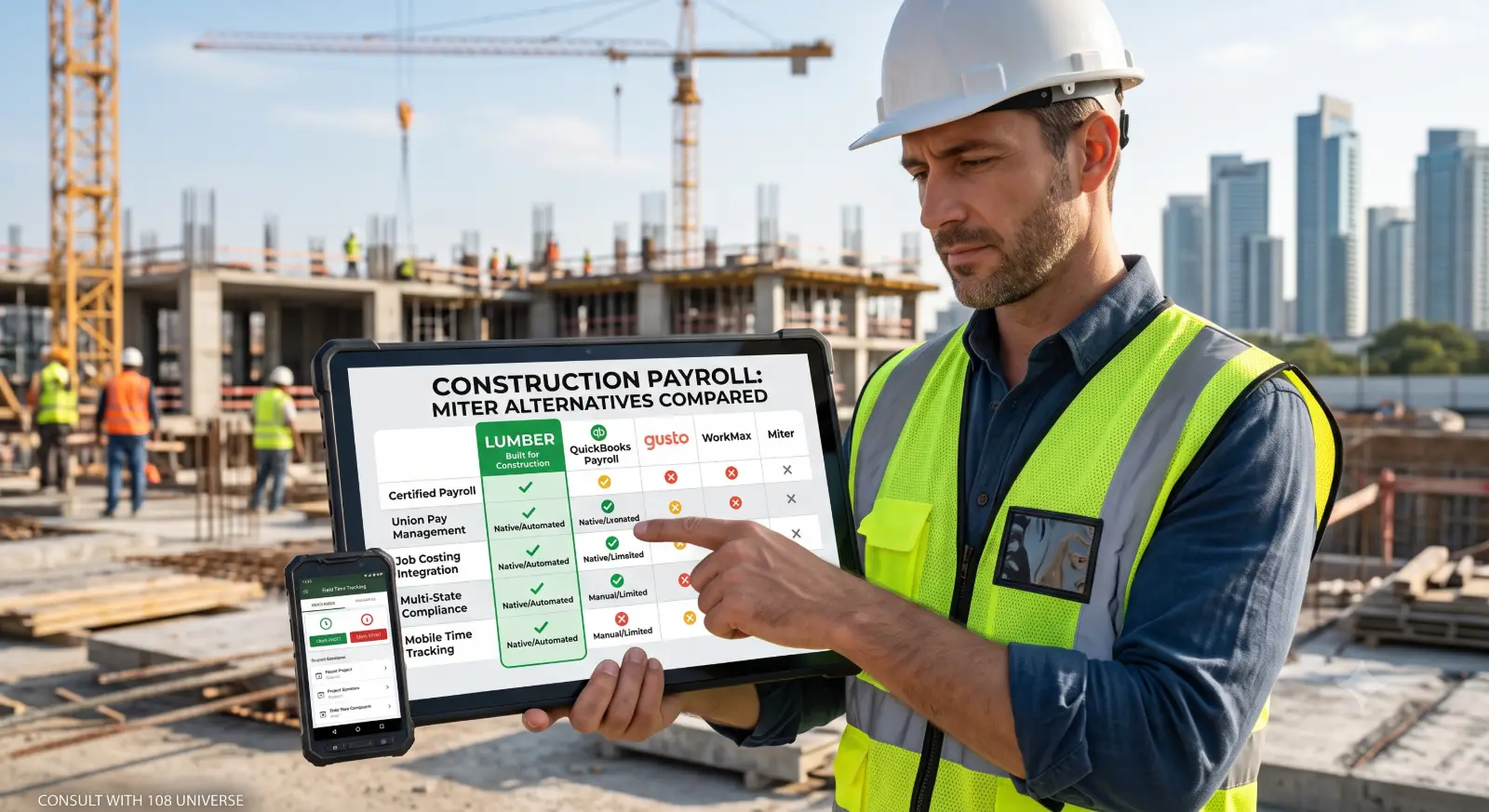
Feature / PlatformLumberQuickBooks PayrollGustoWorkMaxPrimary FocusConstruction OnlyGeneral Small BusinessGeneral Small BusinessField Service & ConstructionCertified PayrollBuilt-in (Automated)Manual / Third-partyManual / LimitedThird-party integrationUnion Pay ManagementAdvanced native supportBasic / Custom itemsNot supportedModerateJob CostingDeep project-level trackingModerateBasicStrong field focusApp UsabilityField-first designOffice-first designOffice-first designField-first design
1. Lumber (The Industry-Specific Choice)
Lumber is purpose-built for the construction industry, designed specifically to solve the administrative headaches that general-purpose payroll software ignores. Instead of forcing construction workflows into a generic template, Lumber treats job costing, certified payroll, and field time tracking as core priorities.
Key Advantages:
Native Certified Payroll: Automatically formats and populates reports required for government and federally funded projects, saving hours of administrative work each week.
Seamless Job Costing: Every hour logged by a field worker ties directly to the corresponding project budget, giving estimators and project managers instant visibility into labor burn rates.
Designed for the Job Site: The interface is built for supervisors and workers who prefer straightforward mobile interactions over complex desktop software.
Potential Trade-offs:
Because Lumber is tailored specifically for construction, trades, and related field services, it is not designed for traditional office-only businesses or retail storefronts.
2. QuickBooks Payroll
QuickBooks is a household name in small business accounting. Many general contractors use QuickBooks for their general ledger, making QuickBooks Payroll an obvious initial consideration when looking to move away from Miter.
Key Advantages:
All-in-One Accounting: Keeps your general ledger, accounts payable, and payroll within the same ecosystem, reducing the need for third-party data synchronization.
Widespread Familiarity: Most bookkeepers and accountants already know how to navigate QuickBooks, making onboarding straightforward for office staff.
Potential Trade-offs:
Limited Construction Features: QuickBooks handles basic time tracking and standard payroll well, but advanced construction needs—like complex union fringes, multi-tier prevailing wage calculations, and automated certified payroll—often require manual workarounds or expensive add-ons.
Field Disconnect: The mobile experience is geared toward general service providers rather than heavy civil or commercial construction crews operating across multiple job sites.
3. Gusto
Gusto is widely praised for its sleek user interface, excellent customer support, and robust benefits administration for small to mid-sized businesses.
Key Advantages:
Exceptional User Experience: One of the easiest platforms on the market for onboarding new office employees, managing benefits, and handling standard tax filings.
HR and Benefits: Strong integration with health insurance, retirement plans, and worker's compensation providers.
Potential Trade-offs:
Not Built for the Dirt: Gusto struggles with the nuance of construction payroll. It lacks native certified payroll report generation for government projects and does not natively support complex union rules or multi-rate job costing out of the box. For contractors who occasionally hire subcontractors or need strict prevailing wage compliance, Gusto requires significant external spreadsheet work.
4. WorkMax
WorkMax focuses heavily on field service management, mobile time tracking, and labor management, making it another alternative often compared to Miter.
Key Advantages:
Powerful Field Data Collection: Excellent GPS geofencing, facial recognition for clock-ins, and offline mode for remote job sites.
Resource Scheduling: Strong tools for scheduling crews and equipment across multiple jobs.
Potential Trade-offs:
Payroll Processing Depth: While WorkMax excels at time capture, it often relies on integrations with external payroll processors to handle the actual tax filing and disbursement, meaning you may still need a separate system to complete your payroll run.
Why Lumber is the Best Alternative for Construction Teams
When evaluating Miter alternatives, the decision ultimately boils down to specialization. General-purpose tools like QuickBooks and Gusto require you to adapt your construction workflows to fit software built for office environments. WorkMax provides great field tools, but often requires stitching together separate solutions for time tracking and actual payroll disbursement.
Lumber eliminates this friction by unifying what construction companies actually need under one roof:
Eliminate Double Entry: When time cards are approved in the field, they flow directly into payroll calculations and project cost reports without manual transcription.
Reduce Compliance Risks: Automated certified payroll and prevailing wage tracking protect your business from costly audit penalties and compliance errors on public projects.
Protect Profit Margins: Real-time visibility into labor costs allows project managers to catch budget overruns before they eat into your profit margins.
Switching payroll providers always requires some planning, but transitioning to a platform designed specifically for your industry pays dividends in administrative efficiency and project accuracy.
Next Steps for Your Construction Business
If you are tired of wrestling with generic payroll tools or looking for a seamless migration away from Miter, it is time to evaluate a platform built for the realities of modern construction.
To discuss how to streamline your construction tech stack, integrate field operations with your accounting workflows, or scale your digital infrastructure, book a free consultation with our engineering team at 108 Universe.

Rohit Bairwa
Published on · 6 min read read